
Posts

How to Make Your Domain Unspoofable (And Why It Matters)
November 18, 2025 • Cybersecurity
The email arrives in your inbox with an intriguing subject line: “Exploring a Granting Opportunity.” It’s from Wendy Chen, President and CEO of a foundation. The message is brief and professional, asking if they have time to discuss potential funding for your organization. You check LinkedIn. There really is a Wendy Chen at this foundation. The email address shows wendy@foundationname.org. Everything looks legit.
The only issue is, this email didn’t come from Wendy. If the recipient were to hover over the reply button, they’d see the response will go to a completely different email address—one that clearly has nothing to do with the foundation.
This is domain spoofing in action.
In this scam, an attacker sends an email that appears to come from a trusted organization, but replies go to an address they control. Once someone responds, the entire conversation thread stays with the attacker. Unless you check the email address you’re communicating with at every new reply to the thread, you may not ever notice that you’re not actually talking to the foundation.
This type of attack works when an organization hasn’t implemented basic email protections that tell the internet: “Only these approved platforms can send email on our behalf.” However, the good news is that once these protections are in place, spoofed emails are blocked before they ever reach an inbox.
Why email spoofing puts your organization at risk
Domain spoofing poses real threats to nonprofits, foundations, and advocacy organizations. Attackers send emails impersonating your organization, soliciting fake “granting opportunities,” requesting donations that go straight to them instead of your mission, and ultimately damaging your reputation. They also target your own staff using spoofed executive emails that may request urgent changes to direct deposit information or asking employees to purchase gift cards for fake “donor appreciation events.”
Your public profile makes you vulnerable. If your organization has published information about receiving a grant, or if funders have listed you as a grantee, you’ve likely appeared on target lists for spoofing.
But these attacks only work when your email isn’t properly protected.
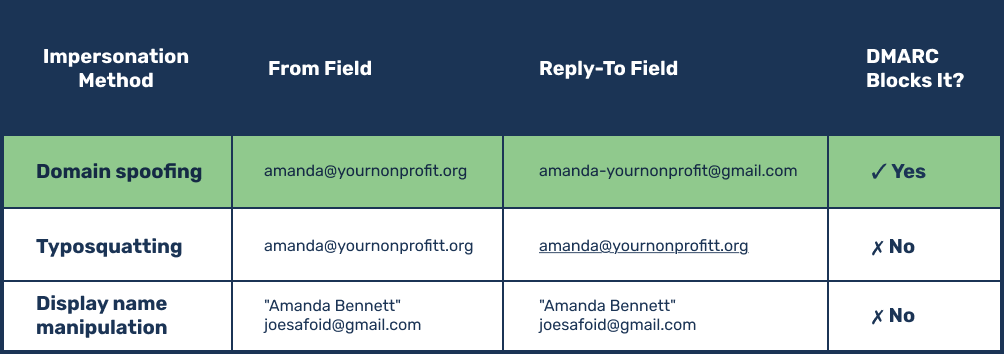
Three ways attackers impersonate you (and which ones you can stop)
Not all email impersonation relies on the same tactics. Understanding the differences helps you know what protections actually solve.
1. Domain spoofing
This is the most dangerous method. The attacker sends an email that genuinely appears to come from your domain—say, amanda@yournonprofit.org—but configures it so replies go to an address they control, like amanda-yournonprofit@gmail.com.
Most people don’t check the reply-to field because it’s not always displayed clearly in email platforms. This is the kind of attack you can prevent through email authentication.
2. Typosquatting
This involves purchasing a domain that’s almost identical to yours. An attacker might register yournonproit.org (missing an “f”) or your-nonprofit.org (adding a hyphen).
Email authentication can’t stop this kind of impersonation scam because the attacker is technically using a different domain which they own, even though the domain is intended to impersonate your own.
3. Display name manipulation
This is the crudest method. Attackers use a random email address but change the display name to impersonate someone at your organization—like “Executive Director” joerandom479@gmail.com.
Anyone who looks past the display name to the actual email address can spot this immediately.
To fight email scams involving typosquatting or display name changes, you need complementary protections like phishing awareness training. The security measures we’re discussing in this article stop domain spoofing, which begins by understanding a core element of how your email works.
Advanced security starts by understanding your domain
Think of your domain as your organization’s planted flag on the internet. If your website is www.yournonprofit.org, then “yournonprofit.org” is your domain. You purchase it from a domain registrar—companies like GoDaddy or Cloudflare—and pay annually to keep it.
Your domain has settings that act like signposts:
- Where should emails sent to your domain be delivered?
- Which platforms should be allowed to send emails from your domain?
- What should happen to emails claiming to be from your domain if they’re not sent by approved platforms?
A challenge we see frequently is many organizations don’t know where to find their domain settings or who has access to them. This information often lives with whoever set up your website years ago, and that knowledge doesn’t always get transferred when staff move on. Knowing how to access your domain is critical to your organization’s security and operations, so make sure the administrator(s) of your domain is clearly documented!
How email authentication works (explained simply)
The goal in securing your domain is straightforward: Tell the internet, “Only these specific platforms can send email on behalf of our organization.”
To make that happen, three cryptically named components work together. You don’t need to know what these acronyms stand for — just what they do:
SPF and DKIM records function as your approved sender list
These are settings you add to your domain for each platform you use to send email, such as Google Workspace, Mailchimp, or your CRM system. Some platforms use SPF, some use DKIM, and some use both. You need to configure at least one for each platform that you use to send email.
Your DMARC record sets your enforcement policy
This tells email providers like Gmail and Outlook what to do when they receive an email from your domain. There are three policy levels:
- ‘None’ (monitoring mode): Collect information about who’s sending email using your domain, but deliver everything.
- ‘Quarantine’: Send suspicious emails to spam.
- ‘Reject’: Don’t deliver unauthenticated emails at all.
Once you’ve told the internet your approved platforms through SPF and DKIM records, you can tell email providers to reject anything else through your DMARC policy. Only authorized platforms can successfully send email from your domain.
Anyone can look up their settings using free tools like Dmarcian’s DMARC Inspector. You might discover when checking your own organization that your DMARC record is set in monitoring mode, which offers no actual protection. In our experience, this is the most common scenario — organizations never progress to setting up real protection for their domain.
The two-part benefit: security and deliverability
As of 2024, Google and Yahoo require organizations to have email authentication records in place, and Microsoft joined them in 2025. DMARC records aren’t just a cybersecurity recommendation — it directly affects whether your emails reach inboxes at all.
Properly configured email authentication delivers two distinct benefits. On the security side, it blocks attackers from sending emails that appear to come from your domain, protecting your organization against fraud. On the deliverability side, it ensures legitimate emails land in inboxes instead of spam folders, meaning your fundraising appeals reach donors, your newsletters arrive on schedule, and your event invitations don’t mysteriously disappear.
The hidden challenge: Knowing your email tech stack
Before you can lock down the platforms you’ve authorized to send email for your organization, you need to identify every tool your organization uses to send email. This software inventory challenge is fundamentally a people problem, not just a technical one.
Beyond the obvious platforms such as Google Workspace, your newsletter tool, or your CRM, you may also send email through your fundraising tools. Or perhaps a help desk system someone set up two years ago. Or you may use platforms to send donation receipts.
Then you have to account for any legacy systems. Someone may have set up a Mailchimp account three years ago, but that person has moved on. Your staff doesn’t have this system documented, but it’s still sending occasional emails from your domain.
If you implement strict email authentication before identifying all your platforms, you run the risk of blocking legitimate email from being sent. This is where the real work happens—and why many organizations get stuck.
Expertise is key to securing your domain
A methodical, phased approach makes email authentication manageable without compromising your organization’s email functionality.
1. Start with monitoring mode
Implement a basic DMARC record set to “none” policy. This generates reports about what platforms are sending email using your domain. These reports are impossible for humans to read without specialized tools. Personified offers a DMARC analysis tool to our clients to interpret the data and present it in actionable formats to show, for example, 2,000 emails came from Google using your domain last week, 500 from Salesforce, and 3,000 from Mailchimp. The report will also show if these platforms are configured with proper SPF or DKIM records.
2. Audit and authenticate your platforms
Review every platform identified in the reports. For each one, ask your team: “Are we actually still using this?” Remove any inactive platforms from your approved list to prevent someone from creating an account later and sending from your domain without authorization. Tracking your organization’s active and legacy email tools requires coordinating across departments and sometimes will uncover forgotten accounts.
3. Gradually increase protection
Once you’ve authenticated your legitimate platforms, move your DMARC policy to “quarantine” so suspicious emails get sent to spam. Watch carefully for inadvertently blocked emails that are legitimate before eventually progressing to a “reject” policy, which blocks unauthenticated emails entirely.
This process demands extreme care. These records must be formatted exactly right—they’re almost like programming in that they’re completely literal. One typo or missing character can disrupt email for your entire organization.
When you work with an agency like Personified, email authentication is part of our baseline service. We add SPF records for our own help desk system when we onboard clients, so our support replies don’t end up in your spam folder. However, if you aim to tackle this independently, invest in a DMARC reporting tool and dedicate time to evaluating your software.
Your path forward toward an unspoofable domain
With email authentication properly configured, any spoofed foundation email like our opening example would never have been delivered. The recipient’s email provider would have checked the DMARC policy, seen that the email didn’t come from an authorized platform, and blocked it.
Email authentication is one layer in the Swiss cheese model of cybersecurity. It doesn’t protect against everything, but it closes a critical vulnerability that attackers actively exploit. The alternative—remaining in monitoring mode or having no DMARC policy—means your domain can be used by attackers to impersonate your organization today.
The implementation requires experienced technical precision and organizational coordination. If that feels daunting, this is exactly the kind of work that benefits from finding the right partnership.
Ready to protect your domain? Let’s talk about making email authentication work for your organization.